性能的计算方式
确认自己需要关注的指标
常见的指标有:
- 页面总加载时间 load
- 首屏时间
- 白屏时间
业界比较关注的通用指标一般是页面总加载时间 和 白屏时间
window.performance.timing
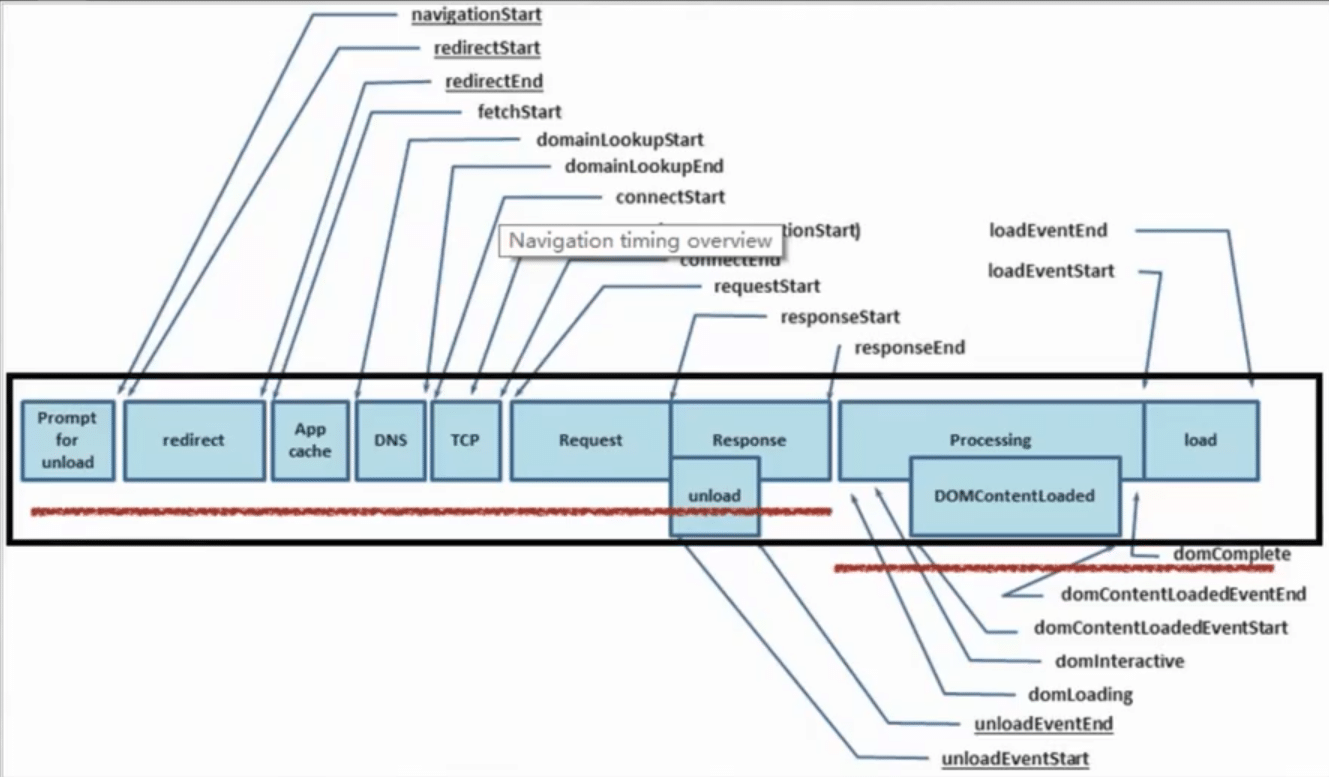
各个属性所代表的含义
connectStart, connectEnd
分别代表 TCP 建立连接和连接成功的时间节点. 如果浏览器没有进行 TCP 连接(比如使用持久化连接 websocket), 则两者都等于 domainLookupEnd;
tcp 连接耗时 = connectEnd - connectStart
domComplete
Html 文档完全解析完毕的时间节点;
domContentLoadedEventStart
代表 DOMContentLoaded 事件触发的时间节点, 页面文档完全加载并解析完毕之后, 会触发 DOMContentLoaded 事件, HTML 文档不会等待样式文件, 图片文件, 子框架页面的加载(load 事件可以用来检测 HTML 页面是否完全加载完毕(full-loaded));
domContentLoadedEventEnd
代表 DOMContentLoaded 事件完成的时间节点, 刺客用户可以对页面进行操作, 也就是 jQuery 中的 domready 时间;
domInteractive
代表浏览器解析 html 文档的状态为 interactive 时的时间节点. domInteractive 并非 DOMReady, 它早于 DOMReady 触发, 代表 html 文档解析完毕(即 dom tree 创建完成)但是内嵌资源(比如外链 css、js 等)还未加载的时间点;
domLoading
代表浏览器开始解析 html 文档的时间节点. 我们知道 IE 浏览器下的 document 有 readyState 属性, domLoading 的值就等于 readyState 改变为 loading 的时间节点;
domainLookupStart, domainLookupEnd
分别代表 DNS 查询的开始和结束时间节点. 如果浏览器没有进行 DNS 查询(比如使用了 cache), 则两者的值都等于 fetchStart;
fetchStart
是指浏览器发起任何请求之前的时间值. 在 fetchStart 和 domainLookupStart 之间, 浏览器会检查当前文档的缓存;
loadEventStart, loadEventEnd
分别代表 onload 事件触发和结束的时间节点;
navigationStart
浏览器最初加载页面的时间, 所有的时间指标都以此为基准;
redirectStart, redirectEnd
如果页面是由 redirect 而来, 则 redirectStart 和 redirectEnd 分别代表 redirect 开始和结束的时间节点;
requestStart
代表浏览器发起请求的时间节点, 请求的方式可以是请求服务器、缓存、本地资源等;
responseStart, responseEnd
分别代表浏览器收到从服务器端(或缓存、本地资源)响应回的第一个字节和最后一个字节数据的时刻;
ecureConnectionStart
可选. 如果页面使用 HTTPS, 它的值是安全连接握手之前的时刻. 如果该属性不可用, 则返回 undefined. 如果该属性可用, 但没有使用 HTTPS, 则返回 0;
unloadEventStart, unloadEventEnd
如果前一个文档和请求的文档是同一个域的, 则 unloadEventStart 和 unloadEventEnd 分别代表浏览器 unload 前一个文档的开始和结束时间节点. 否则两者都等于 0.
performance 具体计算
performance.ts
import VueRouter from 'vue-router';
import {BaseTrack} from "./track";

export class Performance {
    public static readonly timing = window.performance && window.performance.timing;

    public static init(): void {
        window.addEventListener('load', () => {
            if (!Performance.timing) {
                console.log("当前浏览器不支持 Performance API");
                return;
            }

            // TODO 上报各种时间指标
            BaseTrack.track(Performance.getTimings());
        });
    }

    public static record(router?: VueRouter) {
        const setFPT = () => {
            if (window.performance && window.performance.now) {
                Performance.fpt = window.performance.now();
            }
        };
        return {
            created: () => {
                if (router) {
                    router.onReady(() => {
                        setFPT();
                    });
                } else {
                    setFPT();
                }
            }
        };
    }

    public static getTimings() {
        if (!Performance.timing) {
            console.warn("当前浏览器不支持 Performance API");
            return {};
        }
        return {
            redirect: Performance.getRedirectTiming(),
            dns: Performance.getDnsTiming(),
            tcp: Performance.getTcpTiming(),
            ttfb: Performance.getTimeOfFirstByte(),
            req: Performance.getRequestTiming(),
            ppdt: Performance.getParseDomTime(),
            dclt: Performance.getDomContentLoadTime(),
            fpt: Performance.getFirstPaintTime(),
            load: Performance.getLoadTime()
        };
    }

    private static fpt: number = 0;

    /**
     * 重定向耗时
     * @private
     */
    private static getRedirectTiming(): number {
        return Performance.timing.redirectEnd - Performance.timing.redirectStart;
    }

    /**
     * DNS查询耗时
     * @private
     */
    private static getDnsTiming(): number {
        return Performance.timing.domainLookupEnd - Performance.timing.domainLookupStart;
    }

    private static getTcpTiming(): number {
        return Performance.timing.connectEnd - Performance.timing.connectStart;
    }

    /**
     * 读取页面第一个字节耗时
     * @private
     */
    private static getTimeOfFirstByte(): number {
        return Performance.timing.responseStart - Performance.timing.navigationStart;
    }

    /**
     * request 请求耗时
     * @private
     */
    private static getRequestTiming(): number {
        /* 有待商榷 */
        return Performance.timing.responseEnd - Performance.timing.responseStart;
    }

    /**
     * 解析纯 dom 树的耗时(不包含 js css 等外链资源的加载与执行)
     * @private
     */
    private static getParseDomTime(): number {
        return Performance.timing.domInteractive - Performance.timing.domLoading;
    }

    /**
     * 页面资源的加载耗时
     * @private
     */
    private static getDomContentLoadTime(): number {
        return Performance.timing.domComplete - Performance.timing.domInteractive;
    }

    /**
     * 页面 load 总耗时
     * @private
     */
    private static getLoadTime(): number {
        return Performance.timing.loadEventStart - Performance.timing.navigationStart;
    }

    private static getFirstPaintTime(): number {
        return Math.round(window.performance.getEntriesByName('first-paint')
            && window.performance.getEntriesByName('first-paint')[0]?.startTime) || Performance.fpt;
    }
}
track.ts
import queryString from 'query-string';
import { v4 as uuid } from 'uuid';

let image: HTMLImageElement | null;

export class BaseTrack {

    public static track(params: {[key: string]: any}) {
        try {
            const qs = queryString.stringify({
                timestamp: Date.now(),
                traceId: BaseTrack.getTraceId(),
                url: location.href,
                ...params,
            });
            BaseTrack.reportByImg(qs);
        } catch (e) {
            console.error(e);
        }
    }

    /**
     * tips 为什么上报的请求使用 .gif 图像请求
     * @private
     */
    private static serverUrl: string = "";

    private static reportByImg(qs: string, retryTimes: number = 3) {
        const retry = () => {
            image = null;
            if (retryTimes > 0) {
                BaseTrack.reportByImg(qs, retryTimes - 1);
            }
        };

        return new Promise((resolve, reject) => {
            try {
                image = new Image();
                image.onerror = () => {
                    retry();
                }
                image.src = BaseTrack.serverUrl + qs;
            } catch (e) {
                console.error(e);
            }
        });
    }

    private static getTraceId() {
        try {
            const trackKey = "qiuku_trace_key";
            let traceId = localStorage.getItem(trackKey);
            if (!traceId) {
                traceId = uuid();
                localStorage.setItem(trackKey, traceId);
            }
            return traceId;
        } catch (e) {
            console.error(e);
            return "";
        }
    }
}
main.ts
import Vue from 'vue';
import App from './App.vue';
import './registerServiceWorker';
import router from './router';
import {Performance} from './utils/performance';

Vue.config.productionTip = false;

Performance.init();

new Vue({
    router,
    render: (h) => h(App),
    mixins: [Performance.record(router)],
}).$mount('#app');
vue 指令
代码 尝试用一个指令, 挂载在重要元素上, 当此元素 inserted 就上报
typescriptVue.directive("analysis", { inserted(el, options) { console.log(`${options.value} = ${Date.now() - window.performance.timing.navigationStart}`); } });
性能优化
加速或减少 HTTP 请求损耗和服务端的请求交互耗时, js css img cdn 资源
强缓存
协商缓存
4×4 之类的小图标可以用 base64
prefetch
延迟加载
window.onload
图片的懒加载 vueLazyLoad
spa 路由懒加载
减少请求内容的体积
gzip
brotli
浏览器渲染原理
js 和 css 阻塞渲染的问题, 应该放在 html 的哪个位置比较好?
优化用户等待体验
loading
骨架图
本地如何查看页面性能
chrome performance
chrome-extension 的请求混杂在页面请求中, 难以分析
filter 中填写 -scheme:chrome-extension 即可过滤掉插件请求
webpack 打包分析
webpack-bundle-analyzer 插件, 代码: vue.config.js + package.json
"analysis": "vue-cli-service serve"js/* vue.config.js */ module.exports = { configureWebpack: config => { if (process.env.npm_lifecycle_event === "analysis") { const { BundleAnalyzerPlugin } = require("webpack-bundle-analyzer"); config.plugins.push( new BundleAnalyzerPlugin({ generateStatsFile: true, statsOptions: { source: false } }) ); } }; }
如何监控性能变化?
- 日志上报 阿里云演示
- pagespeed PageSpeed Insights (web.dev)
- 数据分析 90分位 50分位 TP50、TP90 和 TP99 等指标常用于系统性能监控场景, 指高于 50%、90%、99% 等百分线的情况.
具体的优化方式
浏览器渲染原理
和渲染息息相关的主要有
GUI 渲染进程
JS 引擎先抽
tips
回流(reflow)
当浏览器发现某个部分发生了变化影响了布局, 需要倒回去重新渲染. reflow 会从
<html>这个 root frame 开始递归往下, 依次计算所有的结点集合尺寸和位置. reflow 几乎是无法避免的. 现在界面上流行的一些效果, 比如树状目录的折叠、展开(实质上是元素的显示与隐藏)等, 都将引起浏览器的 reflow. 鼠标滑过、点击...... 只要这些行为引起了页面上某些元素的占位面积、定位方式、边距等属性的变化, 都会引起它内部、周围甚至整个页面的重新渲染.重绘(repaint)
渲染流程主要分为以下 4 步:
- 解析 HTML 生成 DOM 树
- 构建 Render 树
- 布局 Render 树
- 绘制 Render 树
css 资源和 js 资源的放置位置
js 的异步执行
其他
一、图片资源优化
懒加载
html<!DOCTYPE html> <html lang="en"> <head> <meta charset="UTF-8"> <meta http-equiv="X-UA-Compatible" content="IE=edge"> <meta name="viewport" content="width=device-width, initial-scale=1.0"> <title>Document</title> <style> .image-item { display: block; margin-bottom: 50px; height: 200px; } </style> </head> <body>             <script> const viewHeight = window.innerHeight || document.documentElement.clientHeight || document.body.clientHeight; function lazyload() { const eles = document.querySelectorAll("img[data-original][lazyload]"); Array.prototype.forEach.call(eles, function (item, index) { const rect = item.getBoundingClientRect(); if (rect.bottom >= 0 && rect.top < viewHeight) { let img = new Image(); img.src = item.dataset.original; img.onload = function () { item.src = img.src; }; } }); } lazyload(); // 刚开始还没滚动屏幕时, 要先触发一次函数, 初始化首页的页面图片 document.addEventListener("scroll", lazyload); </script> </body> </html>预加载图片等资源
jslet img = new Image(); img.src = item.dataset.original; img.onload = function () { item.src = img.src; };webp, 渐进式加载
二、其它静态资源加载优化
quickLink
prefetch
puglink(rel="dns-prefetch" href="//www.baidu.com") link(rel="preconnect" href="//www.baidu.com") tcp link(rel="preload" as="script" href="xxxx") link(rel="preload" as="image" href="xxxx")静态资源压缩
gzip, Brotli
webpack
打包优化
骨架图
服务端渲染
同构渲染 - next.js nuxt.js
pug 模板渲染
动态 polyfill
阿里云 cdn: https://polyfill.alicdn.com/polyfill.min.js?features=es6,es7,es2017,es2018&flags=gated
不重要的资源延迟加载
节流 防抖
节流: 当持续触发事件的时候, 保证一定时间内只调用一次事件处理函数(监听页面滚动事件).
防抖: 当持续触发事件时, 一定时间内没有再触发事件, 事件处理函数才会执行一次(搜索框, 当用户完全输入完成后, 才会触发搜索函数).