正式特性
【了解】类文件 API
类文件 API 是一个专为框架和工具开发者设计的强大特性。长期以来,如果你想要在运行时动态生成、分析或修改 Java 字节码,就必须依赖像 ASM、Javassist 或者 CGLIB 这样的第三方库。
而且操作字节码需要深入了解底层细节,学习难度很大,我只能借助 AI 来搞定。
// 使用 ASM 库生成一个简单的类
ClassWriter cw = new ClassWriter(ClassWriter.COMPUTE_MAXS);
cw.visit(V17, ACC_PUBLIC, "com/example/GeneratedClass", null, "java/lang/Object", null);

MethodVisitor mv = cw.visitMethod(ACC_PUBLIC, "<init>", "()V", null, null);
mv.visitCode();
mv.visitVarInsn(ALOAD, 0);
mv.visitMethodInsn(INVOKESPECIAL, "java/lang/Object", "<init>", "()V", false);
mv.visitInsn(RETURN);
mv.visitMaxs(1, 1);
mv.visitEnd();

// 生成 sayHello 方法
mv = cw.visitMethod(ACC_PUBLIC, "sayHello", "()Ljava/lang/String;", null, null);
mv.visitCode();
mv.visitLdcInsn("Hello from generated class!");
mv.visitInsn(ARETURN);
mv.visitMaxs(1, 1);
mv.visitEnd();

cw.visitEnd();
byte[] bytecode = cw.toByteArray();
有了类文件 API,操作字节码变得简单了一些:
import java.lang.classfile.*;
import java.lang.classfile.constantpool.ConstantPoolBuilder;
import java.lang.constant.ClassDesc;
import java.lang.constant.MethodTypeDesc;

public byte[] generateClass() {
    return ClassFile.of().build(ClassDesc.of("com.example.GeneratedClass"), cb -> {
        // 添加默认构造函数
        cb.withMethod("<init>", MethodTypeDesc.of(ConstantDescs.CD_void), ACC_PUBLIC, mb -> {
            mb.withCode(codeb -> {
                codeb.aload(0)
                     .invokespecial(ConstantDescs.CD_Object, "<init>", MethodTypeDesc.of(ConstantDescs.CD_void))
                     .return_();
            });
        });

        // 添加 sayHello 方法
        cb.withMethod("sayHello", MethodTypeDesc.of(ConstantDescs.CD_String), ACC_PUBLIC, mb -> {
            mb.withCode(codeb -> {
                codeb.ldc("Hello from generated class!")
                     .areturn();
            });
        });
    });
}
读取和分析现有的类文件也很简单:
public void analyzeClass(byte[] classBytes) {
    ClassModel cm = ClassFile.of().parse(classBytes);

    System.out.println("类名: " + cm.thisClass().asInternalName());
    System.out.println("方法列表:");

    for (MethodModel method : cm.methods()) {
        System.out.println("  - " + method.methodName().stringValue() +
                          method.methodType().stringValue());
    }
}第三方字节码库可能需要一段时间才能跟上新特性的变化,而官方的类文件 API 则能够与语言特性同步发布,确保开发者能够使用最新的字节码功能。
实际应用示例
import java.lang.classfile.*;
import java.lang.constant.ClassDesc;
import java.lang.constant.MethodTypeDesc;

public class DynamicClassGenerator {
    public static void main(String[] args) throws Exception {
        // 生成一个简单的数据类
        byte[] personClassBytes = generatePersonClass();

        // 将类文件写入磁盘
        java.nio.file.Files.write(
            java.nio.file.Paths.get("Person.class"),
            personClassBytes
        );

        // 动态加载并使用生成的类
        Class<?> personClass = loadClass("Person", personClassBytes);
        Object person = personClass.getConstructor(String.class, int.class)
                                  .newInstance("张三", 25);

        System.out.println("生成的对象: " + person);

        // 调用生成的方法
        String name = (String) personClass.getMethod("getName").invoke(person);
        int age = (int) personClass.getMethod("getAge").invoke(person);

        System.out.println("姓名: " + name + ", 年龄: " + age);
    }

    // 生成 Person 类
    public static byte[] generatePersonClass() {
        return ClassFile.of().build(ClassDesc.of("Person"), classBuilder -> {
            // 添加字段
            classBuilder.withField("name", ConstantDescs.CD_String, ClassFile.ACC_PRIVATE | ClassFile.ACC_FINAL);
            classBuilder.withField("age", ConstantDescs.CD_int, ClassFile.ACC_PRIVATE | ClassFile.ACC_FINAL);

            // 构造函数
            classBuilder.withMethod("<init>",
                MethodTypeDesc.of(ConstantDescs.CD_void, ConstantDescs.CD_String, ConstantDescs.CD_int),
                ClassFile.ACC_PUBLIC, methodBuilder -> {
                methodBuilder.withCode(codeBuilder -> {
                    codeBuilder.aload(0)  // this
                              .invokespecial(ConstantDescs.CD_Object, "<init>", MethodTypeDesc.of(ConstantDescs.CD_void))
                              .aload(0)   // this
                              .aload(1)   // name 参数
                              .putfield(ClassDesc.of("Person"), "name", ConstantDescs.CD_String)
                              .aload(0)   // this
                              .iload(2)   // age 参数
                              .putfield(ClassDesc.of("Person"), "age", ConstantDescs.CD_int)
                              .return_();
                });
            });

            // getName 方法
            classBuilder.withMethod("getName", MethodTypeDesc.of(ConstantDescs.CD_String),
                ClassFile.ACC_PUBLIC, methodBuilder -> {
                methodBuilder.withCode(codeBuilder -> {
                    codeBuilder.aload(0)
                              .getfield(ClassDesc.of("Person"), "name", ConstantDescs.CD_String)
                              .areturn();
                });
            });

            // getAge 方法
            classBuilder.withMethod("getAge", MethodTypeDesc.of(ConstantDescs.CD_int),
                ClassFile.ACC_PUBLIC, methodBuilder -> {
                methodBuilder.withCode(codeBuilder -> {
                    codeBuilder.aload(0)
                              .getfield(ClassDesc.of("Person"), "age", ConstantDescs.CD_int)
                              .ireturn();
                });
            });

            // toString 方法
            classBuilder.withMethod("toString", MethodTypeDesc.of(ConstantDescs.CD_String),
                ClassFile.ACC_PUBLIC, methodBuilder -> {
                methodBuilder.withCode(codeBuilder -> {
                    codeBuilder.ldc("Person{name='")
                              .aload(0)
                              .getfield(ClassDesc.of("Person"), "name", ConstantDescs.CD_String)
                              .invokevirtual(ConstantDescs.CD_String, "concat",
                                           MethodTypeDesc.of(ConstantDescs.CD_String, ConstantDescs.CD_String))
                              .ldc("', age=")
                              .invokevirtual(ConstantDescs.CD_String, "concat",
                                           MethodTypeDesc.of(ConstantDescs.CD_String, ConstantDescs.CD_String))
                              .aload(0)
                              .getfield(ClassDesc.of("Person"), "age", ConstantDescs.CD_int)
                              .invokestatic(ConstantDescs.CD_String, "valueOf",
                                          MethodTypeDesc.of(ConstantDescs.CD_String, ConstantDescs.CD_int))
                              .invokevirtual(ConstantDescs.CD_String, "concat",
                                           MethodTypeDesc.of(ConstantDescs.CD_String, ConstantDescs.CD_String))
                              .ldc("}")
                              .invokevirtual(ConstantDescs.CD_String, "concat",
                                           MethodTypeDesc.of(ConstantDescs.CD_String, ConstantDescs.CD_String))
                              .areturn();
                });
            });
        });
    }

    // 动态加载类
    public static Class<?> loadClass(String name, byte[] classBytes) {
        return new ClassLoader() {
            @Override
            protected Class<?> findClass(String name) {
                return defineClass(name, classBytes, 0, classBytes.length);
            }
        }.loadClass(name);
    }
}
【了解】Stream Gatherers 流收集器
Stream API 自 Java 8 引入以来,极大地改变了我们处理集合数据的方式,但是在一些特定的场景中,传统的 Stream 操作就显得力不从心了。Stream Gatherers 正是对 Stream API 的一个重要扩展,它解决了现有 Stream API 在某些复杂数据处理场景中的局限性,补齐了 Stream API 的短板。
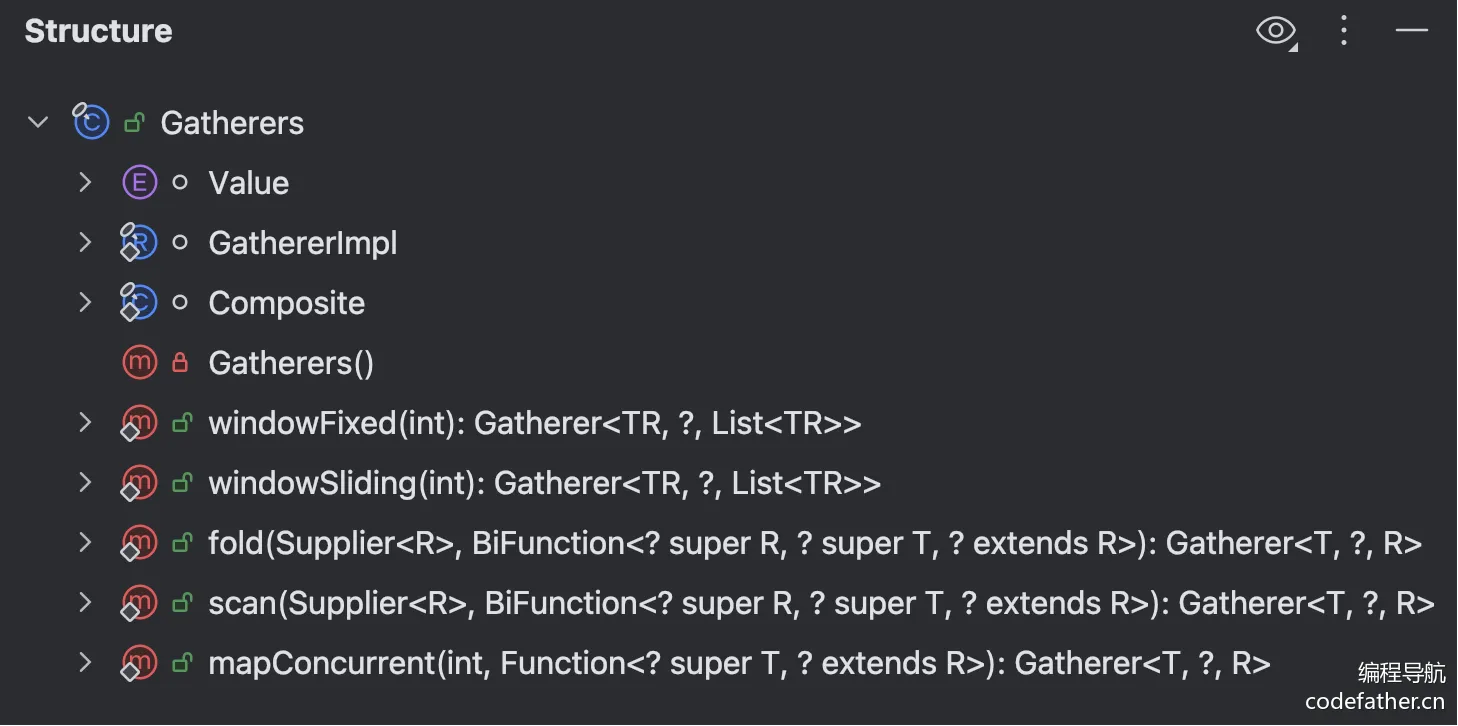
如果你想实现一些复杂的数据聚合操作,比如滑动窗口或固定窗口分析,可以直接使用 Java 24 内置的 Gatherers。
// 1. 滑动窗口 - windowSliding(size)
List<Double> prices = Arrays.asList(100.0, 102.0, 98.0, 105.0, 110.0);

List<Double> movingAverages = prices.stream()
    .gather(Gatherers.windowSliding(3))  // 创建大小为 3 的滑动窗口
    .map(window -> {
        // window 是 List<Double> 类型,包含 3 个连续元素
        return window.stream()
                    .mapToDouble(Double::doubleValue)
                    .average()
                    .orElse(0.0);
    })
    .collect(Collectors.toList());

System.out.println("移动平均值: " + movingAverages);
// 移动平均值: [100.0, 101.66666666666667, 104.33333333333333]

// 2. 固定窗口 - windowFixed(size)
List<String> logs = Arrays.asList("log1", "log2", "log3", "log4", "log5");

List<List<String>> batches = logs.stream()
    .gather(Gatherers.windowFixed(3))  // 每 3 个元素组成一个批次
    .collect(Collectors.toList());

System.out.println("批量处理: " + batches);
// 批量处理: [[log1, log2, log3], [log4, log5]]
还有更多方法,感兴趣的同学可以自己尝试:
除了内置的 Gatherers 外,还可以自定义 Gatherer,举一个最简单的例子 —— 给每个元素添加前缀。先自定义一个 Gatherer:
Gatherer<String, ?, String> addPrefix = Gatherer.ofSequential(
    () -> null,  // 不需要状态,所以初始化为 null
    (state, element, downstream) -> {
        // 给每个元素添加 "前缀-" 并推送到下游
        downstream.push("前缀-" + element);
        return true;  // 继续处理下一个元素
    }
    // 不需要 finisher,省略第三个参数
);
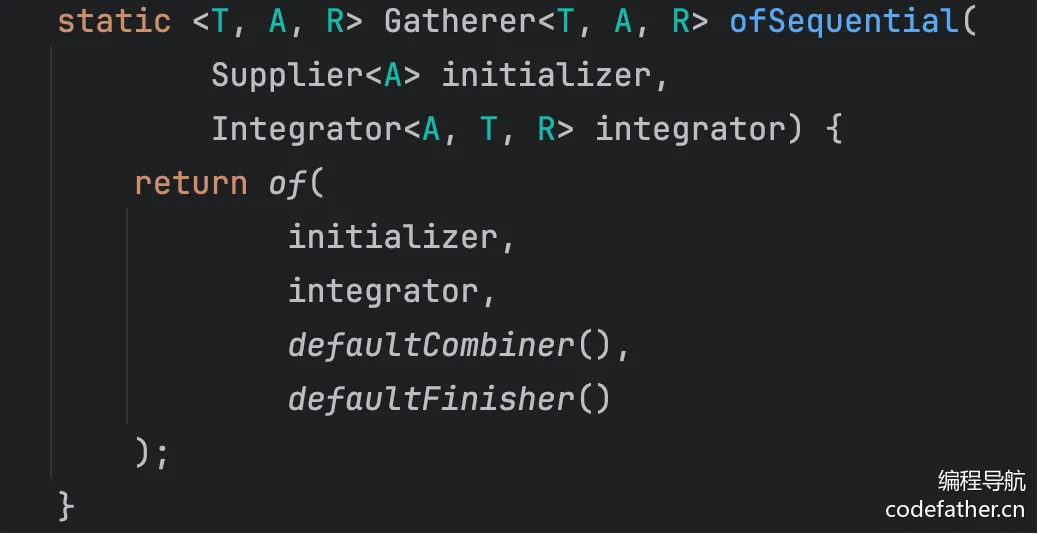
Gatherer.ofSequential 方法会返回 Gatherer 接口的实现类:
然后就可以愉快地使用了:
List<String> names = Arrays.asList("鱼皮", "编程", "导航");
List<String> prefixedNames = names.stream()
    .gather(addPrefix)
    .collect(Collectors.toList());

System.out.println(prefixedNames);
// 输出: [前缀-鱼皮, 前缀-编程, 前缀-导航]
这个例子展示了 Gatherer 的最基本形态:
不需要状态:第一个参数返回 null,因为我们不需要维护任何状态
简单转换:第二个参数接收每个元素,做简单处理后推送到下游
无需收尾:省略第三个参数,因为不需要最终处理
虽然这个例子用 map() 也能实现,但它帮助我们理解了 Gatherer 的基本工作机制。
这就是 Stream Gatherers 强大之处,它能够维护复杂的内部状态,并根据业务逻辑灵活地向下游推送结果,让原本需要手动循环的复杂逻辑变得简洁优雅。
Stream Gatherers 的另一个优势是它和现有的 Stream API 完全兼容。你可以在 Stream 管道中的任何位置插入 Gatherer 操作,就像使用 map、filter 或 collect 一样自然,让复杂的数据处理变得既强大又优雅
实际应用示例
import java.util.stream.Gatherer;
import java.util.stream.Gatherers;

public class StreamGatherersAdvanced {
    public static void main(String[] args) {
        // 股票价格分析
        List<StockPrice> prices = List.of(
            new StockPrice("AAPL", 150.0, "2024-01-01"),
            new StockPrice("AAPL", 152.0, "2024-01-02"),
            new StockPrice("AAPL", 148.0, "2024-01-03"),
            new StockPrice("AAPL", 155.0, "2024-01-04"),
            new StockPrice("AAPL", 158.0, "2024-01-05"),
            new StockPrice("AAPL", 160.0, "2024-01-06")
        );

        // 使用滑动窗口计算移动平均
        System.out.println("=== 5日移动平均 ===");
        prices.stream()
            .gather(Gatherers.windowSliding(3))
            .forEach(window -> {
                double avg = window.stream()
                    .mapToDouble(StockPrice::price)
                    .average()
                    .orElse(0.0);
                String lastDate = window.get(window.size() - 1).date();
                System.out.printf("%s: %.2f\n", lastDate, avg);
            });

        // 自定义 Gatherer - 检测价格突破
        Gatherer<StockPrice, ?, PriceBreakthrough> breakthroughDetector =
            Gatherer.ofSequential(
                () -> new BreakthroughState(),
                (state, price, downstream) -> {
                    if (state.previousPrice != null) {
                        double change = (price.price() - state.previousPrice) / state.previousPrice * 100;
                        if (Math.abs(change) > 3.0) { // 超过3%的变化
                            downstream.push(new PriceBreakthrough(
                                price.date(),
                                state.previousPrice,
                                price.price(),
                                change
                            ));
                        }
                    }
                    state.previousPrice = price.price();
                    return true;
                }
            );

        System.out.println("\n=== 价格突破检测 ===");
        prices.stream()
            .gather(breakthroughDetector)
            .forEach(breakthrough -> {
                System.out.printf("%s: %.2f -> %.2f (%.2f%%)\n",
                    breakthrough.date(),
                    breakthrough.fromPrice(),
                    breakthrough.toPrice(),
                    breakthrough.changePercent()
                );
            });

        // 批量处理示例
        List<String> tasks = List.of(
            "task1", "task2", "task3", "task4", "task5",
            "task6", "task7", "task8", "task9", "task10"
        );

        System.out.println("\n=== 批量处理任务 ===");
        tasks.stream()
            .gather(Gatherers.windowFixed(3))
            .forEach(batch -> {
                System.out.println("处理批次: " + batch);
                // 模拟批量处理
                batch.forEach(task -> {
                    try {
                        Thread.sleep(100); // 模拟处理时间
                        System.out.println("  完成: " + task);
                    } catch (InterruptedException e) {
                        Thread.currentThread().interrupt();
                    }
                });
            });
    }

    record StockPrice(String symbol, double price, String date) {}
    record PriceBreakthrough(String date, double fromPrice, double toPrice, double changePercent) {}

    static class BreakthroughState {
        Double previousPrice = null;
    }
}
【了解】其他正式特性
删除 Windows 32 位 x86 端口
Java 24 正式移除了对 Windows 32 位系统的支持:
# 32 位 Windows 系统不再受支持
# 需要使用 64 位系统运行 Java 24
提前类加载和链接
Java 24 引入了提前类加载和链接功能,可以在应用启动前预加载类:
# 启用提前类加载
java -XX:+EagerClassLoading MyApp

# 配合类数据共享使用
java -XX:+EagerClassLoading -XX:SharedArchiveFile=myapp.jsa MyApp
这个特性可以:
减少启动时间:预加载常用类
提高缓存命中率:类信息提前准备
优化内存布局:更好的内存分配策略
永久禁用安全管理器
Java 24 永久禁用了安全管理器:
// 这些 API 在 Java 24 中完全不可用
// System.setSecurityManager(new SecurityManager()); // 已移除
// SecurityManager sm = System.getSecurityManager(); // 始终返回 null
现代应用推荐使用:
容器化安全:Docker、Kubernetes 等
操作系统级安全:进程隔离、用户权限
应用层安全:认证授权框架
ZGC 删除非分代模式
Java 24 完全移除了 ZGC 的非分代模式:
# 这个参数不再有效
# java -XX:+UseZGC -XX:-UseGenerationalZGC MyApp

# ZGC 现在只支持分代模式
java -XX:+UseZGC MyApp
同步虚拟线程而不固定
Java 24 改进了虚拟线程的同步机制,避免了固定到载体线程:
public class VirtualThreadSyncExample {
    private final Object lock = new Object();

    public void demonstrateSynchronization() throws InterruptedException {
        List<Thread> threads = new ArrayList<>();

        // 创建大量虚拟线程进行同步操作
        for (int i = 0; i < 1000000; i++) {
            final int taskId = i;
            Thread vThread = Thread.ofVirtual().start(() -> {
                synchronized (lock) {
                    // 在 Java 24 中,这不会导致虚拟线程固定到载体线程
                    System.out.println("虚拟线程 " + taskId + " 获得锁");
                    try {
                        Thread.sleep(1); // 短暂等待
                    } catch (InterruptedException e) {
                        Thread.currentThread().interrupt();
                    }
                }
            });

            if (i < 10) {
                threads.add(vThread);
            }
        }

        // 等待部分线程完成
        for (Thread thread : threads) {
            thread.join();
        }
    }
}
这个改进让虚拟线程在使用同步块时也能保持高并发性能。
预览特性
【了解】密钥派生函数 API(预览)
Java 24 引入了密钥派生函数 API:
import javax.crypto.KDF;
import javax.crypto.spec.SecretKeySpec;

// 需要启用预览功能
public class KDFExample {
    public static void main(String[] args) throws Exception {
        // 使用 PBKDF2 派生密钥
        KDF kdf = KDF.getInstance("PBKDF2WithHmacSHA256");

        // 设置参数
        byte[] password = "myPassword".getBytes();
        byte[] salt = "randomSalt".getBytes();
        int iterations = 10000;
        int keyLength = 32; // 256 bits

        // 派生密钥
        SecretKeySpec derivedKey = kdf.deriveKey(
            new SecretKeySpec(password, "RAW"),
            salt,
            iterations,
            keyLength,
            "AES"
        );

        System.out.println("派生密钥长度: " + derivedKey.getEncoded().length + " 字节");

        // 使用 scrypt 算法
        KDF scryptKdf = KDF.getInstance("scrypt");
        SecretKeySpec scryptKey = scryptKdf.deriveKey(
            new SecretKeySpec(password, "RAW"),
            salt,
            16384, // N 参数
            8,     // r 参数
            1,     // p 参数
            keyLength,
            "AES"
        );

        System.out.println("Scrypt 密钥长度: " + scryptKey.getEncoded().length + " 字节");
    }
}
【了解】作用域值(第四次预览)
Java 24 继续完善作用域值:
import jdk.incubator.concurrent.ScopedValue;

// 需要启用预览功能和孵化器模块
public class ScopedValueExample {
    private static final ScopedValue<String> USER_ID = ScopedValue.newInstance();
    private static final ScopedValue<String> REQUEST_ID = ScopedValue.newInstance();
    private static final ScopedValue<String> TRACE_ID = ScopedValue.newInstance();

    public static void main(String[] args) {
        // 模拟 Web 请求处理
        handleRequest("user123", "req456", "trace789");
    }

    public static void handleRequest(String userId, String requestId, String traceId) {
        ScopedValue.where(USER_ID, userId)
                   .where(REQUEST_ID, requestId)
                   .where(TRACE_ID, traceId)
                   .run(() -> {
                       System.out.println("开始处理请求");
                       processBusinessLogic();
                   });
    }

    private static void processBusinessLogic() {
        logInfo("处理业务逻辑");

        // 调用服务层
        callService();

        // 调用数据库层
        callDatabase();

        logInfo("业务逻辑处理完成");
    }

    private static void callService() {
        logInfo("调用外部服务");
        // 作用域值自动传递,无需显式参数

        // 模拟异步调用
        Thread.ofVirtual().start(() -> {
            // 在虚拟线程中也能访问作用域值
            logInfo("异步服务调用完成");
        }).join();
    }

    private static void callDatabase() {
        logInfo("查询数据库");
        // 作用域值在整个调用链中都可用
    }

    private static void logInfo(String message) {
        System.out.printf("[%s] [%s] [%s] %s%n",
            TRACE_ID.get(),
            REQUEST_ID.get(),
            USER_ID.get(),
            message
        );
    }
}
【了解】其他预览特性
模式、instanceof 和 switch 中的原始类型(第二次预览)
// 继续完善原始类型的模式匹配
public class PrimitivePatternExample {
    public static void processNumber(Object number) {
        switch (number) {
            case byte b when b > 100 -> System.out.println("大字节值: " + b);
            case byte b -> System.out.println("字节值: " + b);
            case short s when s < 0 -> System.out.println("负短整数: " + s);
            case short s -> System.out.println("短整数: " + s);
            case int i when i % 2 == 0 -> System.out.println("偶数: " + i);
            case int i -> System.out.println("奇数: " + i);
            case long l -> System.out.println("长整数: " + l);
            case float f -> System.out.println("浮点数: " + f);
            case double d -> System.out.println("双精度: " + d);
            default -> System.out.println("其他类型");
        }
    }
}
灵活的构造函数体(第三次预览)
public class FlexibleConstructor {
    private final String processedValue;
    private final int computedHash;

    public FlexibleConstructor(String rawValue) {
        // 可以在 super() 调用前进行复杂处理
        String cleaned = rawValue.trim().toLowerCase();
        int hash = cleaned.hashCode();

        // 验证处理结果
        if (cleaned.isEmpty()) {
            throw new IllegalArgumentException("值不能为空");
        }

        super(); // 调用父类构造函数

        this.processedValue = cleaned;
        this.computedHash = hash;
    }
}
实验特性
【了解】分代 Shenandoah(实验性)
Java 24 引入了分代版本的 Shenandoah 垃圾收集器:
# 启用分代 Shenandoah(实验性)
java -XX:+UnlockExperimentalVMOptions -XX:+UseShenandoahGC -XX:+UseGenerationalShenandoah MyApp

# 监控性能
java -XX:+UnlockExperimentalVMOptions -XX:+UseShenandoahGC -XX:+UseGenerationalShenandoah \
     -Xlog:gc*:gc.log MyApp
【了解】紧凑对象头(实验性)
Java 24 实验性地引入了紧凑对象头,减少对象的内存开销:
# 启用紧凑对象头(实验性)
java -XX:+UnlockExperimentalVMOptions -XX:+UseCompactObjectHeaders MyApp

# 这可以减少每个对象 4-8 字节的内存开销
这个特性对内存密集型应用特别有用。
孵化器特性
【了解】向量 API(第九次孵化器)
Java 24 继续改进向量 API:
import jdk.incubator.vector.*;

public class VectorAPIFinal {
    private static final VectorSpecies<Integer> SPECIES = IntVector.SPECIES_PREFERRED;

    public static void main(String[] args) {
        // 向量化的图像处理示例
        int[] pixels = new int[1024]; // 模拟图像像素
        Arrays.fill(pixels, 128); // 灰色像素

        // 向量化的亮度调整
        adjustBrightness(pixels, 50); // 增加亮度

        System.out.println("处理后的像素值: " + Arrays.toString(Arrays.copyOf(pixels, 10)));

        // 向量化的卷积操作
        int[] kernel = {-1, 0, 1, -2, 0, 2, -1, 0, 1}; // Sobel 算子
        int[] result = new int[pixels.length];
        applyKernel(pixels, kernel, result, 32); // 32x32 图像

        System.out.println("卷积结果: " + Arrays.toString(Arrays.copyOf(result, 10)));
    }

    // 向量化亮度调整
    public static void adjustBrightness(int[] pixels, int adjustment) {
        IntVector adjustmentVec = IntVector.broadcast(SPECIES, adjustment);
        int upperBound = SPECIES.loopBound(pixels.length);

        for (int i = 0; i < upperBound; i += SPECIES.length()) {
            IntVector pixelVec = IntVector.fromArray(SPECIES, pixels, i);
            IntVector adjusted = pixelVec.add(adjustmentVec);

            // 限制在 0-255 范围内
            IntVector clamped = adjusted.max(0).min(255);
            clamped.intoArray(pixels, i);
        }

        // 处理剩余像素
        for (int i = upperBound; i < pixels.length; i++) {
            pixels[i] = Math.max(0, Math.min(255, pixels[i] + adjustment));
        }
    }

    // 向量化卷积操作
    public static void applyKernel(int[] input, int[] kernel, int[] output, int width) {
        // 简化的 3x3 卷积实现
        for (int y = 1; y < width - 1; y++) {
            int upperBound = SPECIES.loopBound(width - 2);

            for (int x = 1; x < upperBound + 1; x += SPECIES.length()) {
                IntVector sum = IntVector.zero(SPECIES);

                // 应用 3x3 卷积核
                for (int ky = -1; ky <= 1; ky++) {
                    for (int kx = -1; kx <= 1; kx++) {
                        int kernelIndex = (ky + 1) * 3 + (kx + 1);
                        int inputIndex = (y + ky) * width + (x + kx);

                        IntVector inputVec = IntVector.fromArray(SPECIES, input, inputIndex);
                        IntVector kernelVec = IntVector.broadcast(SPECIES, kernel[kernelIndex]);

                        sum = inputVec.fma(kernelVec, sum);
                    }
                }

                sum.intoArray(output, y * width + x);
            }
        }
    }
}
总结
Java 24 标志着 Java 平台的又一次重大进步。类文件 API 的正式化为字节码操作提供了官方标准,Stream Gatherers 的引入极大地扩展了流处理的能力。
安全管理器的永久移除和 ZGC 非分代模式的删除体现了 Java 平台的现代化进程,而虚拟线程同步机制的改进进一步提升了并发性能。
预览特性中,原始类型模式匹配、作用域值等特性的持续完善为未来的 Java 编程提供了更多可能性。实验特性如分代 Shenandoah 和紧凑对象头则为性能优化开辟了新的方向。
Java 24 虽然不是 LTS 版本,但它的许多创新特性都将成为未来 Java 开发的重要组成部分,为开发者提供了更强大、更优雅的编程工具。